Posts

Nearly there...

Image
The stove is now surrounded by a really outstanding hearth, with all the pipework boxed in using fireproof board and tiled with gloss black designer tiles. This has been 4 years in the making, but we are finally there. From a technical angle, the stove and oil boiler are now properly valved (after 3 attempts!) so that they don't interfere with each other. We had the oil boiler repaired in October and new baffles, jet and pump were fitted to hopefully give it another few years service life. Interestingly, priming the radiators for 5 minutes with the oil before turning the stove pump on seems a good strategy. I'm very keen now to incorporate this into the controller unit I'm designing. Off to a Raspberry Jam later!
RaspberryPi GPIO Adaptor

Image
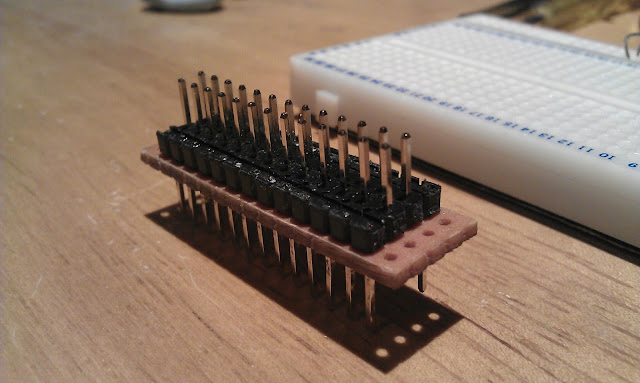
I needed a neat way to connect the RPi to a breadboard and came up with this using an old 26-pin floppy drive cable, an off-cut of tri-pad stripboard and some pin strips.

Found TV

Image
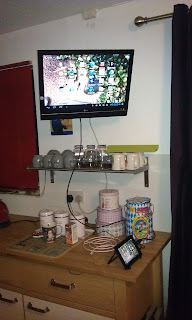
Last week I'm driving along and saw a flat screen TV fly-tipped at the side of the road. It looked like it hadn't been there too long so I snaffed it into the boot of the car. I let it dry out overnight beside a radiator and then plugged it in. Surprise surprise, the backlight was flickering and there was a bad buzz so I was pretty sure that the inverter board was knackered. Hoking in the spares box I found an inverter board from a TV that had suffered a cracked screen. A bit of dodgy test wiring and a connection to my old Sky box and there's Masterchef! The screen is still drying out and I'll need to tidy the wiring, but there's a free LCD TV. The old inverter is integral to the power board, but the circuits are all the same so I can disarm the old inverter and run 12v, GND, Adjust and Enable connections to the new inverter.

Old Skool

Image
I got this meter on eBay for a fiver. I just took a notion for an old school classic meter because it reminded me of my grandfather who was a radio amateur from the 1920s and built his own radio kit.  In his house in Cushendun there was this amazing shortwave transmitter he'd built.  It was in a hammered finish metal case about 5 feet high and had proper dials and meters on it, like something from a 50s science fiction film. I've always loved that retro stuff. Anyway my meter reads 0-5mA and with a 1kOhm resistor in series it reads the 5 volt PWM output from the Arduino perfectly.  I have a notion to use it as a thermometer readout although it would look equally great in a car.

Interceptor

Image
Just a quick post.  I bought an HDMI adaptor for my Android tablet (4.0 ICS), which has an HDMI C 'Mini' connector.  I thought this was the most versatile approach as I have a few standard HDMI cables of different lengths and an HDMI-DVI cable for the RaspberryPi.  Anyway, here is the tablet computer hooked up to the 21-inch TV in the kitchen and if you look closely you can see the Android screen there with apps and the fish-pond wallpaper. My son and I have been using this to watch old episodes of the bonkers-but-brilliant 1989 TV game show 'Interceptor' on YouTube.  If you have never heard of 'Interceptor' then you are in for a treat.  Think 'Treasure Hunt' meets 'Crystal Maze' (it was made by the same production company) with a maniac in a black leather trench coat chasing you around the English countryside in a helicopter while jolly-hockey-sticks Annabel Croft gives you directions to the loot.  Unfortunately there were only 8 episodes ma...

RaspberryPi Access Point

Image
This is the RaspberryPi (RPi) running as an access point (AP).  Okay doesn't look like much, but this is pretty advanced stuff, yet as always relatively simple in Linux once you know what to do.  The key is the D-Link DW-140 wi-fi dongle perched on top of the RPi, which can act as an access point.  Not all wi-fi dongles can do this, but loading the 'iw' wi-fi tools package in Linux and running 'iw list' outputs diagnostics which will tell you if a connected dongle can run in AP mode. All the details are helpfully on this guy's blog - http://sirlagz.net/2012/08/09/how-to-use-the-raspberry-pi-as-a-wireless-access-pointrouter-part-1/ Now my motivation for looking into this was the desire to use one of the tablets as a front end for a vehicle diagnostics system. Problems - Cheap Android tablet computers don't have serial or Bluetooth capabilities; Without Bluetooth or serial how do you communicate; While these can be added, it is complex as the An...

Netbook Upgrade

Image
I'm not usually into buying things before anyone else, but 4 years ago I took a punt and bought my wife one of the very first Acer netbooks as a birthday present.  This was the first serious netbook with a 9-inch screen after the 7-inch Asus which had arrived about a year before.  The Asus screen was just too small for a computer although it paved the way for all sorts of things including OEM distribution of Linux.  The Acer A110 had 512Mb of RAM and an 8Gb solid-state drive, which some people predicted wouldn't last (they have been proved very wrong).  After 2 years constant use the wee Acer was replaced with a new one with more memory and a hard disk drive, but I always fancied upgrading it. The computer was pretty hard to upgrade as it had to be completely taken apart and one internal tiny Phillips screw was very tight.  In the end it needed to be removed by cutting a slot across it with a MiniCraft drill fitted with a circular cutting blade and then using ...